

Enterprise Learning Initiatives.
-
Building a Better Icebreaker
Set the right tone for your session with a different angle on an ice-breaker.“Let’s go around the room.”
“Tell the group your name and title, what you hope to get out of this class, and a fun fact.”
Fun Fact: I’m already not having fun.
- I’m unimpressed that the facilitator is using this tired technique.
- I’m bored, because I either know everyone in the room or don’t think I will need to know them after today.
- I’m distracted and not listening well, because I must come up with answers that are both interesting and haven’t been “taken” by anyone who speaks before I do.
- I’m wishing I’d had another cup of coffee, because when it’s my turn, I should pretend I’m happy to be doing this.
So why do facilitators do it?
- It gets people talking.
- It gives the facilitator information about the group – information that might be helpful as he tries to engage them during the session.
- It confirms that participants’ objectives match the agenda. If they don’t, the facilitator might be able to shift content to satisfy those expectations.
- It sparks relationships between participants.
These are great goals. This technique didn’t come out of nowhere; smart people have been using it for decades because it’s a simple way to kick-start engagement and get important information. But is there a way to avoid the participants’ collective sigh when you say those words?
Let’s find a better way.
Use social networking ahead of the session. The method depends on what you have to work with. If your organization has a communication portal, you could create a group and have everyone check in with their details before the session. If not, you could invite everyone to connect to the others on LinkedIn. Depending on the nature of the group and the context, you could create a group on Yammer or another social media platform – share information about yourself and ask participants to post the information you want before the session.
Do it in a chat. Is your session online? Or will your participants bring a device to the session? Have them connect to your online meeting and use the chat function. They will log in with their names. Then, ask questions and have everyone chat their answers. What do they hope to learn today? What is a problem they’d like to solve? What unexpected talent or experience do they have? If you’re in person, you could still use the chat function, and maybe make a game out of it. For example, “Guess which person in the room is Monica, who says she has a brown belt in karate!” Or, if they already know each other, have them chat “two truths and a lie;” the first one to chat back which one is the lie wins a small prize.
Use your old friend, the flipchart. Low-tech – or just old school? Have each person create a flipchart page, including all the information you want to collect. Or have them create personal and work timelines, showing major events in their lives. Display the pages around the room. Then go around and walk through flipchart aloud, asking participants questions to explore their answers. Bonus: participants might choose to get creative as they design their flipcharts.
Do a roll call. Put the burden on you, the facilitator. Do your homework on each participant ahead of time. Then, as you start the session, call out each person’s name and introduce them; they can fact-check you and offer more information to fill out your introduction.
Use “speed-dating.” Have participants rotate to one-on-one conversations with everyone else in the group, introducing themselves. Or pair them up and give them a mission to find something in common. Afterward, ask the group what they learned about each other that was interesting, helpful or surprising.
Pick a prop. Arrive with a collection of small objects – toys or trinkets. Ask each participant to choose an object and take turns telling one story about themselves that somehow involves their object.
I know what I’m suggesting is harder on you, the facilitator. These alternatives take more thought, more planning and – in some cases – more time. But you want them to like you, right? And you want them to like the work you’re doing together. You want them smiling and relaxed and engaged with each other, start to finish. Kicking off your session in an unexpected way might just pay off – by making your participants more engaged with each other and with you, their facilitator.
-
Why Your Training Needs Advance Organizers
Training? Don’t forget your advance organizer.752461. “Take a minute to memorize this number.” This was the instruction given to me by a high school acquaintance conducting a study on memory. He then gave me a short questionnaire. After it was over, he asked me to recall and tell him the number.
752461. To this day, I remember it. How did that happen? For learning and development professionals, this is important. We work to reinforce retention and recall for our learners, and to overcome anything that gets in the way. For example, the longer a person goes without using what they’ve learned, the less likely they will be able to perform effectively. So we create opportunities for practice.
One of the most effective ways to begin that reinforcement is the use of advanced organizers. An advanced organizer provides a high-level visual outline of the main topics and events in a course. It can be as simple as an agenda, as complex as a diagram, or as unexpected as a comic strip.
So, why and how do advanced organizers increase retention and performance?
- During a learning event, an advanced organizer gives participants a visual preview of topics and activities. This prepares the brain to absorb and organize information, which helps recall and performance later. Also, we know that visual cues are much better for recall than verbal cues alone. Finally, the organizer gives learners a sense of control; they feel better prepared for what is to come, so they are relaxed and attentive when learning.
- After the learning event, learners can use the organizer when they need to perform. For example, if I give you a flow chart showing the best process for making the ultimate peanut butter and jelly sandwich, then teach you to do it, you’ll not only remember the steps more clearly, you can use the flowchart at home in your kitchen if you forget what to do.
That high school researcher was testing the hypothesis that the questionnaire he gave his subjects after they learned the number would inhibit our recall. But he made one critical mistake. By telling me I would be asked to recall the number, he was essentially giving me an advanced organizer – a preview of events. He prepared my brain for what was coming next, so it focused on that number instead of the questionnaire. 752461. All these years later, I still remember the number, I remember the experience, and I use its lessons in my own work as an instructional designer.
-
4 Ways to Help Learners Retain Their Training
Four ways to help learners retain informationWait – what did she say? Oh yeah….now I remember….
Ever find yourself forgetting what you just read? I mean, literally two seconds ago? Even when the topic is interesting, retaining information can be a challenge. Why is that? Is it because the delivery is dry? Was I not actively engaged?
Cognitive psychologists have many theories on why we forget. They categorize retention issues for better understanding, and many debate whether it’s even possible to truly forget. Some believe our brains create models and traces (physical brain changes) each time we encounter new information, creating a permanent effect on the brain. Many believe we do not forget, but if we don’t recall the information often, we lose the ability to retrieve it efficiently (kinda like exercising). No matter which theory is most accurate, there are a few things we can do to help.
Knowledge Check: Do you remember what you just read in this paragraph? No? Geez, you really do need the tips I’m about to discuss. I’ll keep them brief since you will not remember more than two or three anyway!
I’m a learning professional, so my learners’ ability to retain and access information is important to me. Usually, we attempt to help through knowledge checks, quizzes, and post-program tests. Those are all ok, but they are checking for recall. If you don’t give learners an opportunity to immediately apply what they have learned, they will lose more knowledge with each passing day. As their ability to retrieve the information decreases, so does the return on your training investment! To keep your content top-of-mind, use these four simple practices. They are things that learning professionals everywhere know, but don’t often include in their programs.
Extend the learning experience. Is your training a one-time event, where folks check the “attended” box and bolt? Design a program that extends the learning well after the “main event.” There are many ways to do this, including follow-ups, on-the-job challenges, and learning networks. Using these methods, you are shortening the time and strengthening the connection between learning and behavior. Opportunities to apply learning drastically improve the odds of lasting behavior change. This approach is used often by athletic programs; athletes spend countless hours drilling newly learned skills. Be practical; consider your work environment and culture, then design a learning extension that works for your organization.
Involve managers and supervisors. Improve the “stickiness” of those new skills – give managers a role in the learning experience. Provide structured opportunities for them to engage, during and after the learning event, to ensure employees are applying new skills in the right ways. I’m not suggesting turning managers into “Big Brother” – surveilling employees; instead, design moments of reflection and coaching between the manager and their direct reports.
Make it real. Adults are interested in learning that has immediate relevance and impact to their jobs or personal lives. Adults also learn better through problem-centered training, rather than content-oriented training. The best thing we can do to improve the chances of retention and behavior change is to make the training real. Design scenarios that mirror the challenges they face during the average work day. And, to take it a step further, consider integrating post-training behaviors into employees’ official performance goals and rewards.
Use just-in-time (JIT) learning principles. When you can, train only what is immediately needed or used on the job. Just-in-time principles in the inventory process, for example, allow companies to reduce costs and improve efficiencies, but getting this right takes quite a bit of up-front planning. The same is true of just-in-time learning. The learning strategy must be well thought out. For example: What skills can reasonably be taught at the time of need? What are reasonable delivery options? Can the skills be self-taught – without a facilitator (who can be contacted if the employee is confused about the material or experience technical difficulties)? You have to invest some time and effort in JIT, but it can yield huge benefits in retention and, ultimately, the execution of desired behavior.
The information in this blog is not rocket science, and it’s certainly familiar to seasoned learning professionals. But project time pressures often force these retention-building elements onto the back burner. The hard reality is that if employees are not retaining information and demonstrating critical behaviors, we are wasting money and jeopardizing the organization’s delivery, customer service, brand, and reputation. Consider going back to the basics in your next program. Design opportunities to improve retention. After all, if learners aren’t learning and performing, what exactly are we doing?
-
How To Choose a Training Delivery Medium
Use these factors to pick the best training delivery medium.Pop Quiz! Which of these statements do you identify with?
- As an instructional designer, I want to create an experience that is IDEAL for learning new skills and behaviors.
- As an instructional designer, I want to ensure an experience that is PRACTICAL for learning new skills and behaviors.
If you chose #1, you are creative and passionate about the learning experience. You always put the learner’s needs first. You take great pride in creating best-in-class learning experiences.
If you chose #2, you are intelligent and resourceful. You are known for “hitting the bullseye” with the learning you develop. You find creative solutions to overcome obstacles.
You’ve probably figured out by now this was a trick question. The truth is, instructional designers perform a balancing act. We advocate for IDEAL learning while ensuring it is PRACTICAL.
This is especially true when it comes to choosing a training delivery medium. How do you decide between classroom training and eLearning? Face-to-face or virtual? When should you incorporate video or job aids?
This is helpful: the What + Who + Where + When + Resources & Budget equation. Weighing the factors in “4W+R&B” can help you determine the best delivery medium.
What: Understand what your learners need to do
Determine how the learner will apply their new skills on the job. This should drive the learning method. For example, learning to use new software requires hands-on practice. Leadership skills are best learned through face-to-face experiences, watching, practicing, and discussing with others (humans not machines). Learning more knowledge-based content can be done by reading or watching a video.
An IDEAL scenario for systems training is realistic practice, but if a training sandbox or simulation is not PRACTICAL, you’ll have to get creative; find another way to get learners as close to real-life scenarios as possible.
Who: Know your Learners
Find out more about your learners. How many are there? Are they new employees or tenured? Entry level or C-suite? Similar roles or widely different? What is their experience with the organization and with training? What motivates them?
Knowing your learners and understanding what’s important to them helps you deliver a meaningful learning experience. For example, putting learners at all levels in one classroom, taking the same course, might be PRACTICAL but it’s certainly not IDEAL.
Where: Find your learners
Where will training take place? Are there technology or logistical restrictions? What languages do your learners speak? Where will learners use their new skills and knowledge? Are they co-located or dispersed?
The logistics help determine the best learning delivery medium. For example, if you have a large number of learners across the globe, delivering small class sessions might be IDEAL but is not very PRACTICAL.
When: Learn the timeframes
When do your learners need to perform using the new skills or knowledge? Is the deadline in one week? One month? One year? If you don’t have the time to develop the IDEAL training, then you must lean toward a PRACTICAL option.
Resources and Budget
The scope of the learning solution will depend partly on the resources available. Who is available to develop the program? Consider instructional designers, subject matter experts, graphic design, super users, video production team, and so on.
Budget is not always a fun thing to consider, but it is very important. Don’t spend your time, energy, and focus on an IDEAL solution if you don’t have the budget to support it.
However, if you believe the budget and resources do not allow you to create a successful learning experience for your learners – if you find yourself pretty far away from IDEAL – consider advocating for your learners. Build your case. Estimate an ROI and illustrate the need for the budget and/or resources you need. Remember, a budget increase at the beginning of a project is more manageable and less costly than a budget over-run because the first round didn’t work and you had to retrain!
So in the end, the correct answer to the Pop Quiz was #3:
- As an instructional designer, I want to ensure the learning experience is a BALANCE between the ideal and the practical.
-
Tips to Design Game-Based Learning
If you want to incorporate a game into your learning program, follow these guidelines.An increasing number of companies integrate game-based learning into training, on-boarding, and employee development programs. Many studies support game-based learning and the positive impacts on employees. However, designing learning games takes a lot of effort and expertise. We learning professionals don’t always have the right skills for game development.
I have used the following guidelines to make sure learning game design is sound.
Five Elements of Game-Based Learning
Use challenges. Challenges cater to our basic need to win. We feel happy when we win, and get upset when we lose. Players are motivated when they have something to overcome or achieve. This can be a big challenge (e.g., rescuing a princess at the end of the game) or several micro-challenges throughout the game (e.g., leveling up your skills to fight a dragon). After choosing the game challenges, determine the difficulty level and winning conditions for each one. If the task is too difficult, players get frustrated and give up.
Are the tasks in your game challenging but achievable?
Provide choices. They add fun and reinforce learning. A game that lacks choices – where players advance the game merely by performing the next task – is less engaging. Allow for the gameplay to change based on player choices. For example, let the player to choose different abilities to use during the game (e.g., ability to fly/attack). Choices give learners a sense of control and confidence. The player choices should relate to the learning objectives, so making correct choices demonstrates mastery of skills.
Do players get to make meaningful choices or decisions in your game?
Build in variety. Players get bored if they are repeatedly doing the same action throughout the game. For example:
- Swap out the main theme – change the city background to a desert.
- Give learners extra powers as they progress through the game, allowing them to move between levels more easily.
- Let them personalize their settings, like choosing accessories for game characters.
Does your game offer a variety of elements?
Allow progress. Players enjoy advancing in the game – seeing and reaching important or satisfying milestones. Here are a few ways to do it:
- Increase complexity as the learner moves through levels.
- Allow players to unlock achievements like game ranks and titles.
- Include currency in the game and allow players to earn it and purchase new tools, accessories, or powers.
Does your game let players make progress, gather rewards and reach milestones?
Give feedback. Feedback helps the player understand the consequences of their game choices. Many games do this through sound and visuals. Each incidence of feedback should relate to a learning objective, so each is a potential learning moment.
Will your learners receive feedback that relates to their learning objectives?
Learning professionals understand how to build effective learning programs, but when we use games as a platform, we have to do some learning of our own. We must understand the principles of an effective instructional game. At a minimum, games should include challenges, choices, variety, progress and feedback.
-
Help Your Learners Behave
Our Learning and Development director talks about helping clients get the critical behavior changes that drive their projects.At Emerson, we focus on behavior. Behavior change is all we do. For our change practice, the behavior focus always seemed very clear. But Learning and Development folks like me have a mental shift to make. We often assume “behavior” refers to soft skills or leadership qualities. But what about the learners? Working with this company has helped me think of behavior change as the goal for every learning program.
Recently, one of our clients was implementing a new Product Lifecycle Management system. My L&D team was charged with developing the technical training. Early on, our change team members were facilitating behavior change workshops for the client; our L&D team sat in. They identified the “from/to” behaviors for this change and prioritized them to make the most impact. Then they worked together to create a plan to shift learners’ behaviors.
As they worked through the process, they found the behaviors driving the biggest impact were “Be Collaborative” and “Be Inclusive.” This was the inspiration my learning team was looking for. My mind started conjuring up ways our technical training could reinforce those behaviors.
Here’s what we did to bring collaboration and inclusion to the forefront of our system training:
- We created an introductory video illustrating the high-level process across all functions, to remind learners that their work was part of a larger effort.
- In all training materials, we referred to the tasks that happened before and after, to create anchor points to the overall process in each scenario.
- During materials review, we invited cross-functional subject matter experts to give their perspectives.
- In those sessions, we asked, “Who isn’t here that should be?” and, if people were missing, we made sure to circle back with them and invite them to the next review.
As we planned our training deployment, we looked at the usual things, like location, number of employees, classroom space, and technology specifications. However, our focus on the two key behaviors helped us expand our delivery approach.
- We scheduled cross-functional training sessions to reinforce the need for collaboration when completing tasks. This also built also built rapport and fostered inclusion.
- We demonstrated cross-functional scenarios, allowing participants to learn their key tasks while also learning a little about their colleagues’.
- We asked cross-functional subject matter experts to attend training sessions to talk about their areas and be available to answer questions.
- We created super-super-user roles — the most knowledgeable user in critical cross-functional areas — embedding collaboration and cross-functional knowledge.
This project reinforced for me the importance of that laser-like focus on behavior change for every part of a team and every solution. When learning programs focus on the behaviors critical to the business case, they drive successful change adoption.
-
What Great Training and Great Vacations Have in Common
What makes training great? Some of the same things that make your vacation great.I must admit, I’m a sucker for motivational sayings. They energize, center me, and put things in perspective. One of my favorites is, “In life, you don’t just get to sit on a beach drinking apple martinis.” In other words, the good things in life can (like a vacation or fantastic training) be earned only through hard work.
And I have worked hard. So has my wife – this year she said she really wanted to go to Hawaii. This was probably the first time she truly wanted something and I wanted to make that happen for her and for us. I had a new job, new life, and new perspectives; we’re going to Hawaii! We’ve earned that apple martini on the beach.
As we moved toward our vacation, I started having feelings of déjà vu. I soon realized it was because it felt similar to experiences in my professional life! Here’s what I mean:
Anticipation
Christmas rolled around and it was time to buy our plane tickets. We needed to set a date. Now we were no longer wishing, thinking or discussing. Taking an idea from abstract to concrete changed everything. We now had something to look forward to. In two months, Hawaii was going to happen.
I was amazed at the effect it had on our daily lives. Every day was one day closer to our trip. Instead of talking about what was for lunch or what to do on the weekend, we were talking about we needed to pack and what we were going to do when we got to Hawaii. It felt like we had a lot to do to make sure everything went smoothly, so we were busier, but excited. Our trip was having a positive impact on our lives, even before it happened.
The familiar feeling made me think about the training events I create. Setting training dates has a similar effect. Whether you are the one developing the material or attending the course, putting the date on a calendar crystalizes your thinking. Preparation amps up and deadlines feel more real as everyone watches the calendar tick closer to the big day. It creates a sense of excitement and urgency that doesn’t exist until you have a concrete plan.
Partitioning
As our vacation neared, we made detailed plans. We would have six days on the big island and a lot of things we wanted to do. We planned our days to maximize the fun and relaxation. The big events got the highest priority, so the volcano, the beach, and the observatory were scheduled first.
Then we looked at what we could do around those priority events. We wanted time at the beach, and Hawaii has some of the best snorkeling beaches in the world, so snorkeling seemed a good add-on. We had the volcano day booked and found some sights to see on our path back to the hotel. There were some things we simply didn’t have time for; we put them in the “next trip” bucket. Each day became a container we filled with the experiences we most wanted to make to make lifelong memories.
Optimizing my time comes naturally, after years as an instructional designer. Tight training plans are essential for my clients. We know how many days we have to train, how many people we need to move through, and how much of their time we can have each day. For instructor-led training, we block critical learning objectives into training modules, and high-priority training modules into the day. We slot supporting objectives and modules around the essentials. Objectives with the lowest criticality might be delivered at different times or using different learning methods. Some might fall off the plan altogether, depending on the organization’s or learner’s constraints, but we keep our eye on the most critical outcomes.
Intensity
Departure day finally came. We had been anticipating and preparing for months, and we knew this is our time. As expected, Hawaii delivered. Even though we had carefully planned the trip, it was surprising – the real-life experiences and unexpected moments were better than we had imagined. The images in my mind — watching a sea turtle swim around my daughter, or listening to an astronomy lecture with my son at the Kīlauea volcano – make memories I’ll carry forever.
Can training create a lasting effect? When you think about the last Instructor-led course you attended, what do you remember? Do you remember the hotel? Do you remember all of the content? It’s probably the high and low points that stay with you – the moments of clarity when something just “clicked,” the activity that made everyone laugh, the spots where you were frustrated and needed help, or the activities where your team worked together to practice something you’d need on the job. Our minds are hard-wired to capture the most intense moments – whether we are in training or on vacation.
The Peak-End Rule
This pattern that works so well for us – anticipation, partitioning, and intensity — is called the “Peak-End rule.” If we understand it, we instructional designers can use it to our advantage.
We can design events that build anticipation, helping learners look forward to the day they get together to try out new behaviors or a new system. We can structure our courses carefully, keeping focus on the most important behaviors — to the individual and the organization. We can build in intensity – challenges, victories, surprises — that fix the experience in people’s minds and help them take those memories forward to their daily lives and jobs, well after the course is over.
You probably won’t be sipping apple martinis on the beach during your next training course, but perhaps you can bring elements of a vacation into the classroom, creating a positive and memorable experience for participants.
-
How to Build a Good Story
Your next training course could have learners hanging on every word. Tell them a story.Stories have a long history as the teaching tool of choice, but not all are created equal – and not all are good for learners. At 16, I loved reading, yet I did not love “The Scarlet Letter.” Reading it was a slog. The odd language and old-timey morality left me cold. But Ms. Wester’s version? It went something like, “This particular adulteress didn’t feel so bad about her ‘sexy time with preacher.’ After years of everyone’s efforts to bring her low, when she and her secret, tortured guy met up alone in the woods, she was ready to go again.” What a difference two sentences can make.
Like any great teacher, Ms. Wester knew a lengthy lecture wasn’t the way to hook us. Instead, all it took was some relatable phrasing and a fresh spin. Learners crave these kinds of stories – the ones that draw us in, fire our imaginations, and, if we’re lucky, surprise us.
Knowing the potential of stories, why isn’t there better storytelling in training? Maybe time constraints are to blame. (We already have miles of ground to cover, and you want me to add more content?!) Or maybe a controlled, play-it-safe approach limits stories to flat, two-dimensional characters. (Employee A always gets it done right, and Employee B never does.) Unfortunately, this disconnect with real-world experiences prompts learners to give us the dreaded snarky-eye-roll-tired-sigh combo. Nobody wants that.
How to Build a Story
Take a minute. Stories can pack a powerful punch in a lot less time than you might expect. Remember, jokes are just short stories with a fun finish. Tweets can be 280-character personal stories shared on a vast scale. In short (pun intended), good stories won’t take time away from content; they are content. Well-chosen, well-placed stories can save time by focusing and clarifying your message.
Set the stage. Narrative organizers, such as well-known fairy tales and shared history, help learners interpret and classify incoming information. When you use each part of a story to introduce content, learners gain a strong sense of where they are in the training. This improves recall as learners associate new information with something they already know well. Moreover, the stories can double as metaphors to reinforce learning. The possibilities are limitless (and fun!). Delivering training on avoiding hidden dangers? Red Riding Hood is your girl. Or how about training on a new testing process? Goldilocks would work. She is, after all, the QA Queen (what with all that testing of porridge, chairs, and beds).
Add a twist. What if Goldilocks didn’t flee for her life but, instead, delivered her test results to the Bear family, leading to across-the-board improvements in porridge temperature, chair strength, and sleeping conditions? In and out of the classroom, people remember novelty. When faced with something new and surprising, we wake up and take notice. Take a story, turn it this way and that, locate those “what ifs,” and then surprise and engage your learners.
Bring the fun. Humor in your stories makes them especially memorable. Humor is also a time-tested antidote to stress, and learning new skills can certainly be stressful. There’s something funny in almost every situation. Find it and inject it into your stories whenever you can.
Make it personal. When learners hear a relatable story, they are more apt to remember it. Personal stories engage learners and encourage them to share their own experiences. This builds a relationship of mutual respect and trust between instructors and learners.
Keep it real. Even when a story is entertaining, if it isn’t realistic and relevant to the training, learners will notice. Rely on experts to confirm every story rings true. This ensures credibility and strengthens learners’ confidence in the training – and its usefulness to them when they’re back on the job.
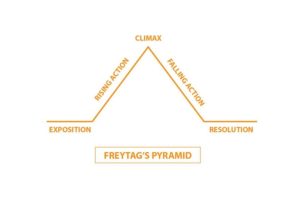
Trust the classics. If you have a story to share, but aren’t quite sure how to tell it, learn from Gustav Freytag, a noted dramatist. Apply his pyramid model to structure any story – from case studies to informal anecdotes – with a hat tip to classic literature and drama.
-
Are Games Right for Your Training
Gamification is trendy – but that doesn’t mean your learners will win. Before you game it up, consider three things.Have you ever wondered whether games would work in your learning programs? If so, congratulations! You have joined the ranks of curious learning professionals who evaluate learning trends before using them.
Here are three ways to determine whether games are a help or a hindrance to your learning program.
Educate yourself.
Video games have come a long way since the 1970s. By 2020, the gaming industry will be worth $90 billion. And instructional designers are contributing to the boom; use of video games in educational settings has become incredibly popular.
Games can provide a virtual environment for active learning. Learning space isn’t restricted to a classroom and activities are in the hands of the learners. They might even be allowed to build their own experiences. For example, Second Life encourages building items within the game. Moreover, games provide the learner with an identity enculturation platform (through a game immersion experience).
Research shows learners who have experimented with learning concepts in a virtual world apply them more easily to real-life scenarios (Hung and Chen, 2007). This is because a gaming platform gives players the chance to practice a skill multiple times in a controlled environment. Furthermore, playing can contribute to a more student-centric experience (Stroup et al. 2007).
Think about ways to use games.
Ask yourself, what am I trying to achieve and how will the game help? Think about the following examples and how they might work for your situation.
- Introduce a learning module in a fun way to spark interest.
- Reinforce concepts by letting learners practice using a new system or tool with goals, rewards, and a little friendly competition.
- Extend practice beyond the classroom into a virtual, realistic world that lets them explore to find the right answer.
- Create relationships between team members that build a foundation for a social learning community that continues beyond training.
Consider your unique circumstances.
Once you know some ways you might implement gaming into your learning program, think through how that may play out.
- Audience: Not everyone likes playing games, especially computer-based games. In the words of Prensky (2001), we are either digital natives, born into the digital world, or digital immigrants who have adopted some technology but might prefer the old-fashioned way. Prensky believes digital natives have a shorter attention span, process information faster, and like to multitask. Games are an excellent medium for digital natives as well as digital immigrants with some interest in or comfort with technology. Consider the ratio of natives to immigrants to predict the effectiveness of technology-based games in your solution.
- Resources: Every project has constraints. Do you have the time and budget to invest? The effort it takes to develop an educational game is directly proportional to the complexity of the game. Some games, like Jeopardy, take little effort while others, like MMORPG or virtual worlds, require a lot. Develop a work plan for each stage of game development, implementation, and maintenance. This will help you estimate the investment and impact on your project.
- Stage: Where are you in the project? If you have already started design or development, it might make more sense to cover objectives with the essentials before thinking about games. If you’re still in planning or conceptual design, you might have the luxury of considering a powerful addition to your program.
- Measurement: Think about your learning objectives and business goals. Gamification might serve your program well if metrics are important. Many games facilitate pre-game assessments, activities with embedded metrics, and post-game evaluations.
There isn’t one answer to the gamification question. Inserting games in your learning programs successfully is both an art and a science. As learning professionals, we look for creative and innovative solutions. We are lucky to have games in the mix!
References
- Marc Prensky, (2001),”Digital Natives, Digital Immigrants Part 1″, On the Horizon, Vol. 9 Iss 5 pp. 1 – 6
- Hung,D & Chen,d.(2007).Context-process authenticity in learning: Implications for identity enculturation and boundary crossing. Education Tech Research Dev 55:147-167
- Stroup, W.M.,Ares, N.,Lesh, R.& Hurford,A. (in press). Diversity by Design: The What, Why, And How of Generativity in Next Generation Classroom Networks. In R. Lesh, E.Hamilton & J.J. Kaput (eds). Models & Modeling as Foundations for the Future in Mathematics Education, Mahwah,NJ: Lawrence Erlbaun Publishing Company.
- Statista (2018), Value of the global video games market from 2011 to 2020 (in billion U.S. dollars),Retrieved here.
-
Take the Learner’s Perspective
Answer these questions before you develop training.One of the first big learning programs I worked on was for a global corporation in the construction industry. They were rolling out a new logistics system to tens of thousands of seasoned blue-collar workers. My team of twenty-something suit-wearing consultants could not have been less credible. Our SMEs (the warehouse supervisors serving as our subject-matter experts) were openly skeptical that we could teach them anything useful. To be honest, we weren’t so sure ourselves.
The new system would touch everyone in their warehouse, forcing them to use handheld radio frequency (RF) terminals to perform nearly every task. They had been 100% paper-based and computer-free, and that’s the way they liked it. We were the bearers of very bad news.
But we were also good instructional designers. We knew we needed to know the new system inside and out but, to serve our learners, we also needed to know them a lot better. Here’s the advice we followed.
Think about each role represented in your audience. Gather enough information – from the right sources – so you can imagine yourself in their shoes, whether they’re pumps or steel-toed boots.
- What are the most important parts of their jobs? Which of their behaviors drive results for their team or their company?
- What is their motivation? What are they rewarded and punished for? What gets them a pat on the back or kudos from the boss?
- What kinds of behaviors are supported or discouraged by company culture?
- What are their work settings? Group? Solitary? Loud? Quiet? Long periods of concentration or lots of switching gears? Office? Cubicle? Shop floor? Car? Retail store?
- What language, acronyms or metaphors do they use? What kinds of communication are they used to and what do they prefer?
- How do they feel about this change? What will their attitudes and expectations be as they start the learning program and as they go back to the job?
The answers? For our learners, the most important thing was moving the right materials and getting orders out the door. They were rewarded for speed and accuracy and encouraged to be team players. Their work setting was a loud warehouse full of lots of people moving constantly.
They were not computer-literate. They communicated through conversation and team meetings and notices or signs posted in the workspace. They had tons of technical terms and shorthand. They were NOT excited about the new system.
They seemed disinterested or annoyed, but we felt that some of this was really fear of failing – suddenly not being able to do the jobs they had mastered over the years. They didn’t want to sit in a classroom for any reason and they didn’t want to return to work and have to use a new system when the stakes were high.
Based on all this, we wanted to move a lot of the learning into the warehouse, but that didn’t fly with our client; we had to train in a classroom. So, we created other elements with our users in mind. One of them was a job aid, showing critical codes and functions for the RF terminal. We made it from tough, flexible plastic with curved corners that wouldn’t cut or scratch. It was pocket-sized, but we also punched a hole in one corner and attached a closed hook so the user could clip it to his belt loop or the RF terminal itself. It was a pretty simple thing, but it was what we thought they would want as they tried to use the new system on the job. Our main SME John agreed.
As expected, our learners approached training warily. They weren’t exactly happy, even as they demonstrated they could use the new system. Day One was rocky, but work was getting done.
A week later, John came to our team with a smile on his face and a story. It seems that Pete, easily our most disgruntled learner, had arrived for his shift, realized he had left his plastic job aid at home, and drove all the way back home to get it. He punched in late for his shift, but apparently it was worth it. We knew then we had done something that mattered, because we took the learner’s perspective.